Back to PortfolioRobotics

ESP32 IoT Water Level Monitor: Firebase Live Dashboard

Friday, August 28, 2026
Share:
ESP32 IoT Water Level Monitor: Firebase Live Dashboard

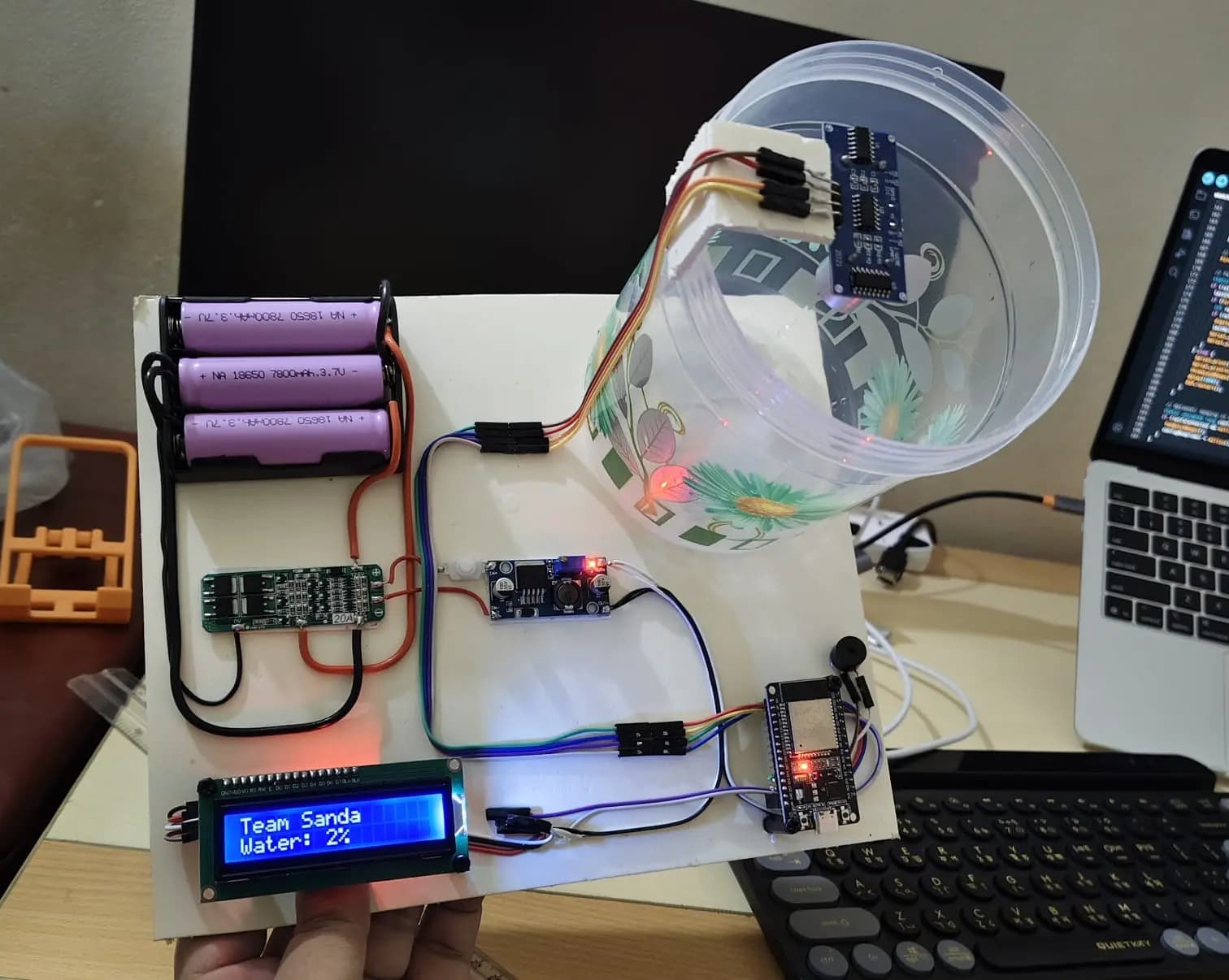
A cloud-connected water level telemetry and automated pump control system engineered around the ESP32 microcontroller. The device continuously monitors reservoir capacity using an ultrasonic sensor conditioned by an onboard digital median filter. Telemetry is streamed in real time to Google Firebase Realtime Database and visualized on a dynamic, responsive web dashboard. The system also supports bi-directional cloud actuation for electromechanical relay switching, full offline fallback handling, audio diagnostics, and local LCD status reporting.

Key Technical Features

  • Real-Time Cloud Synchronization: Connects to Google Firebase Realtime Database via continuous event streaming to provide sub-second dashboard updates and instant remote relay triggering.
  • 7-Sample Median Noise Filter: Implements an onboard array sorting algorithm that collects 7 consecutive ultrasonic ping samples and selects the true median, eliminating false spikes caused by surface ripples or acoustic reflections.
  • Captive Portal Wi-Fi Provisioning: Integrates WiFiManager to allow dynamic SSID and password configuration via a smartphone captive portal without hardcoding network credentials into firmware.
  • Acoustic Diagnostic Telemetry: Features a multi-tone piezoelectric buzzer engine providing distinct audible alerts for boot initialization, Wi-Fi provisioning mode, network dropouts, and critical database errors.
  • Independent Power Subsystem: Powered by a 3-cell (3S) 18650 Lithium-Ion battery pack regulated through an onboard Battery Management System (BMS) and an adjustable DC-DC step-down buck converter to deliver stable 5V rails.
  • Animated Dark-Mode Web Dashboard: Built with modern CSS and the modular Firebase JS SDK v9, featuring a dynamic SVG-style fluid tank visualizer that updates smoothly via CSS transitions.

Hardware Architecture & Pin Mapping

Core Processing & Telemetry

  • ESP32 Dev Module: Handles Wi-Fi networking, Firebase real-time listeners, sensor math, and peripheral control.
  • Ultrasonic Distance Sensor: Measures water level headspace via high-frequency acoustic echo time-of-flight.
  • 16x2 Character LCD (with PCF8574 I2C Backpack): Provides local, on-site readout of system status and capacity.
  • Piezoelectric Passive Buzzer: Produces multi-frequency auditory status feedback.
  • 5V Electromechanical Relay: Controls external pump motors or inlet solenoid valves.

Power Subsystem

  • 3S 18650 Lithium-Ion Battery Bank: High-capacity mobile DC supply.
  • 3S 20A BMS Protection Module: Provides over-charge, over-discharge, and balance protection.
  • DC-DC Step-Down Buck Converter: Converts battery pack voltage down to a steady, regulated 5V power bus.

GPIO Pin Allocation

  • GPIO 12: Ultrasonic TRIG Pin
  • GPIO 13: Ultrasonic ECHO Pin
  • GPIO 2: 5V Relay Control Output (IN)
  • GPIO 4: Piezo Buzzer Output
  • GPIO 21: 16x2 LCD SDA (I2C Data Bus)
  • GPIO 22: 16x2 LCD SCL (I2C Clock Bus)

Sensor Conditioning & Percentage Mapping

The distance reading from the ultrasonic transducer is converted into a calibrated percentage based on physical reservoir limits:

$$\text{Water Level \%} = \text{constrain}\left( \frac{\text{Empty Distance} - \text{Measured Distance}}{\text{Empty Distance} - \text{Full Distance}} \times 100,\ 0,\ 100 \right)$$

The software enforces a deadband threshold, dispatching cloud database writes only when the fluid level fluctuates by $\ge 2\%$, significantly reducing unnecessary network bandwidth and power consumption.

Firmware Implementation (ESP32 / Arduino C++)

cpp
1#include <WiFi.h>
2#include <WiFiManager.h>
3#include <FirebaseESP32.h>
4#include <LiquidCrystal_I2C.h>
5#include <NewPing.h>
6
7// --- Firebase Configuration Placeholders ---
8#define FIREBASE_HOST "YOUR_PROJECT_ID-default-rtdb.firebaseio.com"
9#define FIREBASE_API_KEY "YOUR_FIREBASE_WEB_API_KEY"
10#define USER_EMAIL "your-email@example.com"
11#define USER_PASSWORD "your-account-password"
12
13// --- Hardware Pin Definitions ---
14#define RELAY_PIN 2
15#define BUZZER_PIN 4
16#define TRIG_PIN 12
17#define ECHO_PIN 13
18
19#define MAX_DISTANCE_CM 30
20#define CONTAINER_HEIGHT_CM 14.3
21
22// --- Global Objects ---
23FirebaseData firebaseData;
24FirebaseData streamData;
25FirebaseAuth auth;
26FirebaseConfig config;
27
28bool wifiConnected = false;
29bool streamStarted = false;
30int lastRelayState = -1;
31
32NewPing sonar(TRIG_PIN, ECHO_PIN, MAX_DISTANCE_CM);
33LiquidCrystal_I2C lcd(0x27, 16, 2);
34
35// --- Buzzer Tone Patterns ---
36int melody[] = {262, 294, 330, 349, 392};
37int melodyDuration[] = {150, 150, 150, 150, 150};
38
39void playMelody() {
40 for (int i = 0; i < 5; i++) {
41 tone(BUZZER_PIN, melody[i]);
42 delay(melodyDuration[i]);
43 noTone(BUZZER_PIN);
44 delay(50);
45 }
46}
47
48void twoQuickBeeps() {
49 for (int i = 0; i < 2; i++) {
50 tone(BUZZER_PIN, 880);
51 delay(100);
52 noTone(BUZZER_PIN);
53 delay(100);
54 }
55}
56
57void threeSoftBeeps() {
58 for (int i = 0; i < 3; i++) {
59 tone(BUZZER_PIN, 660);
60 delay(80);
61 noTone(BUZZER_PIN);
62 delay(120);
63 }
64}
65
66void threeLoudBeeps() {
67 for (int i = 0; i < 3; i++) {
68 tone(BUZZER_PIN, 1000);
69 delay(300);
70 noTone(BUZZER_PIN);
71 delay(200);
72 }
73}
74
75void wifiLostBeep() {
76 tone(BUZZER_PIN, 500);
77 delay(150);
78 noTone(BUZZER_PIN);
79}
80
81// --- Firebase Stream Callback for Real-Time Actuation ---
82void streamCallback(StreamData data) {
83 if (data.dataType() == "int") {
84 int state = data.intData();
85 digitalWrite(RELAY_PIN, state == 1 ? HIGH : LOW);
86 lastRelayState = state;
87 Serial.printf("Relay Stream Event: %d\n", state);
88 }
89}
90
91void streamTimeoutCallback(bool timeout) {
92 if (timeout) {
93 Serial.println("Stream Timeout... Reconnecting");
94 }
95}
96
97// --- Captive Portal Connection Setup ---
98bool connectWiFi() {
99 WiFiManager wm;
100 wm.setConfigPortalTimeout(180);
101 if (!wm.autoConnect("ESP32_Water_Setup", "12345678")) {
102 Serial.println("Failed to connect. Restarting...");
103 ESP.restart();
104 return false;
105 }
106 Serial.print("WiFi Connected! IP: ");
107 Serial.println(WiFi.localIP());
108 wifiConnected = true;
109 return true;
110}
111
112// --- 7-Sample Median Filter ---
113int getMedianDistance() {
114 const int NUM_READINGS = 7;
115 int readings[NUM_READINGS];
116
117 for (int i = 0; i < NUM_READINGS; i++) {
118 delay(20);
119 int cm = sonar.ping_cm();
120 readings[i] = (cm > 0) ? cm : 999;
121 }
122
123 // Bubble sort array
124 for (int i = 0; i < NUM_READINGS - 1; i++) {
125 for (int j = i + 1; j < NUM_READINGS; j++) {
126 if (readings[j] < readings[i]) {
127 int temp = readings[i];
128 readings[i] = readings[j];
129 readings[j] = temp;
130 }
131 }
132 }
133
134 int median = readings[NUM_READINGS / 2];
135 return (median == 999) ? 999 : median;
136}
137
138int getWaterLevelPercentage() {
139 float distance = getMedianDistance();
140
141 if (distance == 999) {
142 distance = CONTAINER_HEIGHT_CM;
143 }
144
145 const float EMPTY_CM = 14.0;
146 const float FULL_CM = 3.0;
147
148 distance = constrain(distance, FULL_CM, EMPTY_CM);
149 int percentage = map(distance * 10, EMPTY_CM * 10, FULL_CM * 10, 0, 100);
150 return constrain(percentage, 0, 100);
151}
152
153void updateDisplay(int percentage) {
154 lcd.clear();
155 lcd.setCursor(0, 0);
156 lcd.print("Water Monitor");
157 lcd.setCursor(0, 1);
158 lcd.printf("Level: %d%%", percentage);
159}
160
161void uploadLevelToFirebase(int percentage) {
162 Firebase.setInt(firebaseData, "/waterLevel", percentage);
163}
164
165void setup() {
166 Serial.begin(115200);
167 pinMode(RELAY_PIN, OUTPUT);
168 pinMode(BUZZER_PIN, OUTPUT);
169 WiFi.setSleep(false);
170
171 lcd.init();
172 lcd.backlight();
173 lcd.setCursor(0, 0);
174 lcd.print("Initializing...");
175
176 playMelody();
177
178 if (!connectWiFi()) return;
179 threeSoftBeeps();
180
181 config.host = FIREBASE_HOST;
182 config.api_key = FIREBASE_API_KEY;
183 auth.user.email = USER_EMAIL;
184 auth.user.password = USER_PASSWORD;
185
186 Firebase.begin(&config, &auth);
187 Firebase.reconnectWiFi(true);
188
189 unsigned long start = millis();
190 while (auth.token.uid == "" && millis() - start < 15000) {
191 delay(300);
192 }
193
194 if (auth.token.uid != "") {
195 if (Firebase.beginStream(streamData, "/relay")) {
196 Firebase.setStreamCallback(streamData, streamCallback, streamTimeoutCallback);
197 streamStarted = true;
198 }
199 if (Firebase.getInt(firebaseData, "/relay")) {
200 int state = firebaseData.intData();
201 digitalWrite(RELAY_PIN, state == 1 ? HIGH : LOW);
202 lastRelayState = state;
203 }
204 } else {
205 threeLoudBeeps();
206 delay(500);
207 ESP.restart();
208 }
209}
210
211void loop() {
212 if (WiFi.status() != WL_CONNECTED) {
213 wifiLostBeep();
214 delay(1000);
215 ESP.restart();
216 }
217
218 Firebase.ready();
219
220 static unsigned long lastCheck = 0;
221 if (!streamStarted && millis() - lastCheck > 5000) {
222 lastCheck = millis();
223 if (Firebase.getInt(firebaseData, "/relay")) {
224 int relayState = firebaseData.intData();
225 if (relayState != lastRelayState) {
226 digitalWrite(RELAY_PIN, relayState == 1 ? HIGH : LOW);
227 lastRelayState = relayState;
228 }
229 } else {
230 threeLoudBeeps();
231 delay(1000);
232 ESP.restart();
233 }
234 }
235
236 static unsigned long levelTimer = 0;
237 static int lastStableLevel = -1;
238
239 if (millis() - levelTimer >= 3000) {
240 int level = getWaterLevelPercentage();
241
242 // Deadband filter: only update if delta is >= 2%
243 if (abs(level - lastStableLevel) >= 2 || lastStableLevel == -1) {
244 updateDisplay(level);
245 uploadLevelToFirebase(level);
246 lastStableLevel = level;
247 }
248
249 levelTimer = millis();
250 }
251
252 static unsigned long configBeepTimer = 0;
253 if (!wifiConnected && millis() - configBeepTimer > 2000) {
254 twoQuickBeeps();
255 configBeepTimer = millis();
256 }
257}

Web Dashboard Implementation

html
1<!DOCTYPE html>
2<html lang="en">
3<head>
4 <meta charset="UTF-8" />
5 <meta name="viewport" content="width=device-width, initial-scale=1" />
6 <title>Water Level Monitor</title>
7 <link href="https://fonts.googleapis.com/css2?family=Poppins:wght@400;600;700&display=swap" rel="stylesheet" />
8 <style>
9 :root {
10 --bg-dark: #12141d;
11 --bg-light: #1c1f2f;
12 --primary: #6a5af9;
13 --primary-light: #8b7efc;
14 --text: #e0e0e0;
15 --text-muted: #8e94a8;
16 --accent-off: #3a3f5c;
17 --shadow-color: rgba(0, 0, 0, 0.2);
18 }
19
20 * { box-sizing: border-box; margin: 0; padding: 0; }
21
22 body {
23 background-image: radial-gradient(circle at top, var(--bg-light), var(--bg-dark));
24 color: var(--text);
25 font-family: "Poppins", sans-serif;
26 min-height: 100vh;
27 display: flex;
28 justify-content: center;
29 align-items: center;
30 padding: 40px 20px;
31 }
32
33 .container {
34 max-width: 420px;
35 width: 100%;
36 text-align: center;
37 background: var(--bg-light);
38 border-radius: 24px;
39 box-shadow: 0 10px 50px var(--shadow-color);
40 padding: 40px 30px;
41 border: 1px solid var(--accent-off);
42 }
43
44 header { margin-bottom: 30px; }
45 h1 { font-size: 2rem; font-weight: 700; color: var(--text); }
46 .creator-tag { font-size: 1rem; font-weight: 600; color: var(--primary-light); margin-top: 5px; }
47
48 .water-tank-wrapper {
49 position: relative;
50 width: 150px;
51 height: 300px;
52 margin: 0 auto 20px;
53 border: 5px solid var(--primary);
54 border-radius: 20px 20px 15px 15px;
55 background: var(--accent-off);
56 box-shadow: inset 0 0 10px rgba(0, 0, 0, 0.5);
57 overflow: hidden;
58 }
59
60 .water-fill {
61 position: absolute;
62 bottom: 0;
63 left: 0;
64 width: 100%;
65 background: linear-gradient(180deg, #56ccf2 0%, #2f80ed 100%);
66 border-radius: 15px 15px 0 0;
67 transition: height 0.8s ease;
68 box-shadow: 0 0 15px #2f80ed;
69 }
70
71 .water-percentage {
72 font-size: 1.8rem;
73 font-weight: 700;
74 color: var(--text);
75 letter-spacing: 1px;
76 }
77
78 .tank-labels .bottom-label {
79 position: absolute;
80 bottom: 10px;
81 width: 100%;
82 text-align: center;
83 font-size: 0.9rem;
84 color: var(--text-muted);
85 }
86 </style>
87</head>
88<body>
89 <div class="container" id="dashboard">
90 <header>
91 <h1>Water Level Monitor</h1>
92 <p class="creator-tag">IoT Cloud Dashboard</p>
93 </header>
94
95 <div class="water-tank-wrapper">
96 <div class="tank-labels">
97 <div class="bottom-label">Water Level</div>
98 </div>
99 <div class="water-fill" id="waterFill" style="height: 0%"></div>
100 </div>
101 <div class="water-percentage" id="waterPercentage">0%</div>
102 </div>
103
104 <script type="module">
105 import { initializeApp } from "https://www.gstatic.com/firebasejs/9.23.0/firebase-app.js";
106 import { getDatabase, ref, onValue } from "https://www.gstatic.com/firebasejs/9.23.0/firebase-database.js";
107
108 const firebaseConfig = {
109 apiKey: "YOUR_FIREBASE_API_KEY",
110 authDomain: "YOUR_PROJECT_ID.firebaseapp.com",
111 databaseURL: "https://YOUR_PROJECT_ID-default-rtdb.firebaseio.com",
112 projectId: "YOUR_PROJECT_ID",
113 storageBucket: "YOUR_PROJECT_ID.appspot.com",
114 messagingSenderId: "YOUR_MESSAGING_SENDER_ID",
115 appId: "YOUR_APP_ID"
116 };
117
118 const app = initializeApp(firebaseConfig);
119 const db = getDatabase(app);
120
121 const waterFill = document.getElementById("waterFill");
122 const waterPercentage = document.getElementById("waterPercentage");
123
124 const waterLevelRef = ref(db, "/waterLevel");
125 onValue(waterLevelRef, (snapshot) => {
126 let level = snapshot.val();
127 if (typeof level !== "number" || level < 0) level = 0;
128 if (level > 100) level = 100;
129
130 waterFill.style.height = level + "%";
131 waterPercentage.textContent = level + "%";
132 });
133 </script>
134</body>
135</html>